
Flying Car Simulator Unblocked — Play Free Online
More Stress Relief games


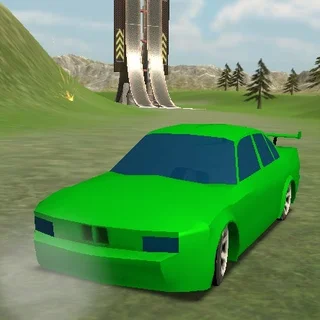









Flying Car Simulator unblocked: play Flying Car Simulator online free right here in your browser — no download, no sign-up, works on a school Chromebook.
Flying Car Simulator combines open-world street driving with high-altitude aerial flight. You drop directly into an expansive urban map packed with straightaways, curving highways, mega ramps, and soaring skyscrapers. Rather than sticking strictly to the asphalt, your vehicle transforms at the push of a button, extending wings so you can launch off hills or accelerate down avenues to take flight across the skyline.
The pace is open-ended and exploratory. There are no rigid lap timers or countdown clocks forcing you down a single path. Instead, you are free to test top-speed drifts along city streets, hit massive ramps to catch air, and weave through the gaps between high-rise buildings before touching back down onto the road.
How to play
Controlling your vehicle relies on responsive keyboard inputs that switch naturally between driving physics and flight aerodynamics:
- WASD or Arrow Keys: Steer, accelerate forward, and brake or reverse while driving on the ground. When airborne, pitch your nose up or down and roll your wings.
- F Key: Toggle flight mode to deploy or retract your wings.
- Left Shift: Engage nitro boost for an explosive burst of speed down straightaways or during takeoff.
- Spacebar: Pull the handbrake for tight turns, drifting around corners, and quick stops.
- C Key: Cycle through different camera perspectives, from a tight chase view to a wider aerial angle.
- R Key: Instantly reset your car back onto the nearest flat ground if you flip over or get wedged between buildings.
Flight mechanics and tips
Mastering flight requires understanding how speed and pitch interact. Here is how to get the most out of your flight time:
- Build ground speed before climbing: Gliding requires forward momentum. Accelerate down a clear road and hit nitro before pitching up; pulling the nose up while moving too slowly will stall the vehicle and drop you back to the pavement.
- Level your wings for long glides: Once you reach your target altitude, level out your pitch. Keeping your flight angle neutral preserves momentum, letting you cruise across the entire city without constantly draining speed.
- Use rooftops for high-altitude runways: Flat skyscrapers make great landing pads and elevated launch zones. Landing atop a tower gives you a vantage point to line up your next jump over the skyline.
- Tap the handbrake when touching down: When returning to street level, tap the handbrake and ease off the throttle to avoid slamming into obstacles or bouncing violently off the pavement.
Similar games on Elastic Man
If you enjoy testing physics and vehicle handling on Elastic Man, there are several other titles worth exploring. Eggy Car trades high-speed city roaming for careful throttle control and hill-climbing balance. If you prefer high-speed reflex challenges, Running Fred delivers fast-paced 3D obstacle avoidance with rapid pacing. Meanwhile, Stickman Hook offers momentum-based aerial physics through pure grappling and swinging mechanics.
Flying Car Simulator runs directly in modern desktop web browsers with WebGL support. A physical keyboard provides the best control for balancing pitch, steering, and nitro acceleration simultaneously.
Questions about Flying Car Simulator
Is Flying Car Simulator unblocked at school?
Flying Car Simulator runs in an ordinary browser tab from elasticman.org, with nothing to download or install, so it plays on most school Chromebooks and work computers. If a network filter blocks the site, only that network's administrator can change it.
How do you switch between driving and flying in Flying Car Simulator?
Press the F key to deploy your wings and activate flight mode. To take off smoothly, build up high ground speed using nitro on a straight road or drive off a ramp, then pull back on the controls to lift your nose into the air.
What are the controls for Flying Car Simulator on desktop?
Use WASD or Arrow Keys for steering and pitch control, Left Shift for nitro acceleration, Spacebar for the handbrake, F to toggle wings, C to cycle camera views, and R to reset your car position.
Can I play Flying Car Simulator on mobile or touchscreen devices?
Flying Car Simulator is optimized for desktop browsers with a physical keyboard due to the multiple key bindings needed for flight pitch, nitro, and steering. Touchscreen devices are not recommended.
Does Flying Car Simulator save my high scores or progress?
Flying Car Simulator is an open-world sandbox session game focused on free-roam driving and aerial stunts, so you can jump in immediately without needing to log in or manage save files.
More games
 Running Fred
 Temple of Boom
 Basketball Shooter
 Skibidi Shooter
 Paint Strike
 Stickman War
 PolyTrack
 Burnout Drift: Hilltop
 Blacktop Police Chase
 Highway Traffic
 Minicars Soccer
 Drive Mad
 Crossy Road
 Bad Ice Cream
 67 Game
 Bloxorz
 Block the Pig
 Monkey Mart
 Cat Clicker RE
 Kiwi Clicker
 Idle Money Tree
 Merge Cakes
 12 MiniBattles
 A Small World Cup 2
 Basketball Legends
 Soccer Skills World Cup
 Doodle Jump